what JSON.stringify() and JSON.parse() are actually doing
every engineer who has built software for the web has probably typed JSON.stringify() or JSON.parse() more times than they can count. we use them almost on instinct. but what are they actually doing?
when data travels across a network, it cannot be sent as a javascript object. objects only exist in memory. they hold references, hidden engine metadata, memory addresses, and other runtime-specific information that only makes sense to the javascript engine that created them. a memory address on my machine is just noise on yours.
so before an object can cross the wire, it has to be serialized. what serialization means here is that the object needs to be converted into a representation that doesn't depend on a particular runtime or memory layout. it has to become something every machine, and every programming language, can understand. in practice, that something is plain text: a string.
that's the job of JSON.stringify().
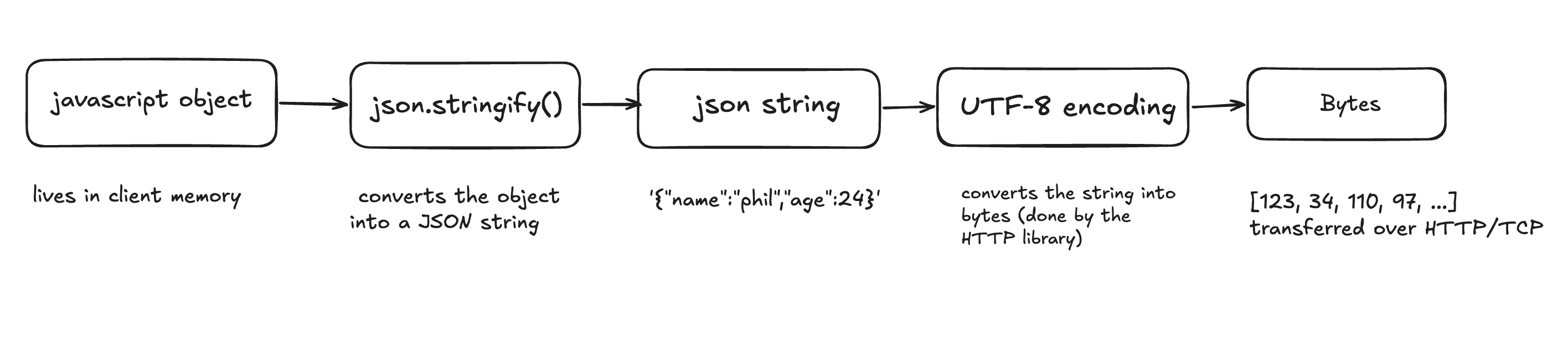
it takes a javascript object and converts it into a json-formatted string.
const user = {
  name: "phil",
  age: 24,
};

const json = JSON.stringify(user);
// '{"name":"phil","age":24}'
notice what happened: we didn't send the object itself. we created a textual description of it.
at this point, nothing has been sent anywhere. the json string is still sitting in memory on the client, inside your application.
the next step happens inside the specific http library or networking stack you're using. networks don't understand javascript objects or strings, they only move bytes. so the json string is encoded into a sequence of bytes, usually using utf-8, and those bytes are written to a socket.
you never write this step yourself, but here's what the library is doing with the string we just produced:
const bytes = new TextEncoder().encode(json);
// Uint8Array(24) [123, 34, 110, 97, 109, 101, 34, 58, ...]
those numbers are the utf-8 byte values of the json text, 123 is {, 34 is ", 110 is n, and so on. this is the form the data is actually in when it leaves your machine.
on the server, the process runs in reverse.
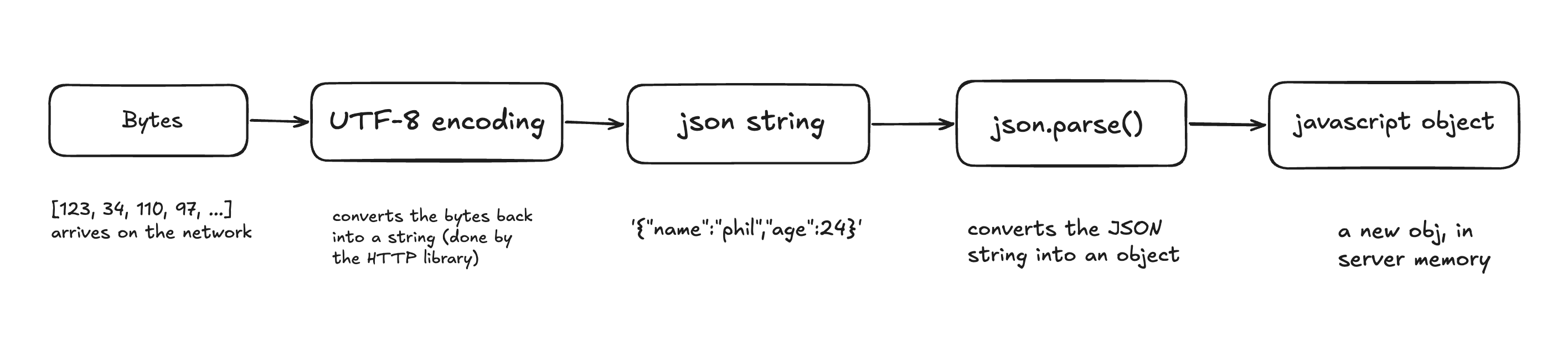
the server first receives a stream of bytes. since JSON.parse() only accepts strings, those bytes are first decoded from utf-8 back into a string. only then can the server parse that string into its own native data structures.
in a node.js server, that looks like this:
const text = new TextDecoder().decode(bytes);
// '{"name":"phil","age":24}'

const user = JSON.parse(text);
// { name: 'phil', age: 24 }
the same bytes that left the client have become a string again, and the string has become an object, a brand new one, built in the server's own memory.
if the server is written in node.js, it uses JSON.parse(). in python, it's json.loads(). in go, it's json.Unmarshal(). every language has its own parser, but they're all reading the exact same json text and rebuilding it into their own in-memory representation.
that's the whole point of json. it's a language-neutral format. javascript objects, python dictionaries, go structs, and java maps all look different in memory, but they can all agree on the same json document.
one subtle but important point is that http has no idea it's transporting json. http only transports bytes. those bytes could represent json, html, an image, a pdf, or a video. the Content-Type: application/json header is what tells the server how those bytes should be interpreted.
put all the pieces together and the picture changes. the end goal of this entire pipeline is bytes, that's the only thing a network can carry. JSON.stringify() is the first step toward that goal: it converts the object into a readable description, and the networking library encodes that description into the bytes that actually travel. the object itself never leaves your process. only its description does, as bytes on the wire.